
Download Postli – AI‑Powered LinkedIn Post Creator, Content Generator, Free Tool
Overview – Why Postli Is Changing the Way Professionals Write on LinkedIn
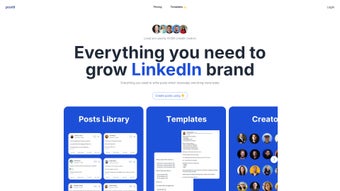
Postli is an AI‑driven web application that turns the often‑tedious task of crafting LinkedIn updates into a single‑click experience. Designed for marketers, influencers, and busy professionals, Postli leverages the power of ChatGPT and Vercel EdgeFunctions to generate high‑quality, engagement‑focused posts in seconds. The platform combines a curated library of templates—hand‑picked from top creators—with smart AI generators that adapt tone, length, and style to match the user’s brand voice.
Because it runs entirely in the browser, there’s no heavy software to install, and the interface is intentionally minimal: you select a template, provide a few key details, and let the AI do the rest. The result is a polished post that feels personal yet optimized for LinkedIn’s algorithm, helping users boost visibility, grow their network, and position themselves as thought leaders without spending hours on copywriting. Since its launch, Postli has amassed a growing user base, a testament to its reliability, speed, and the increasing demand for AI‑assisted social media tools.
Key Features That Make Postli Stand Out
- AI‑Generated Content: Powered by OpenAI’s ChatGPT, Postli creates copy that matches the user’s industry, tone, and target audience.
- Curated Template Library: Over 150 professionally designed LinkedIn post templates, categorized by goal (e.g., thought leadership, product launch, personal story).
- One‑Click Publishing: Export directly to LinkedIn, copy to clipboard, or download as a PDF for later use.
- Real‑Time SEO & Engagement Suggestions: The AI evaluates keyword density, readability, and recommended hashtags to maximize reach.
- Multi‑Language Support: Generates posts in English, Spanish, French, German, and more, expanding global reach.
- Secure Cloud Processing: All AI calculations happen on Vercel EdgeFunctions, ensuring fast response times and data privacy.
- Version History & Editing: Keep track of changes, revert to earlier drafts, and fine‑tune the AI output before publishing.
- Free Tier with Unlimited Drafts: Users can generate as many drafts as they need without a subscription, while premium plans unlock advanced analytics and bulk scheduling.
How These Features Translate Into Real‑World Benefits
For a marketer juggling multiple campaigns, the AI‑generated content feature eliminates the need to draft each post from scratch, freeing up hours each week for strategy and community engagement. Influencers benefit from the curated template library, which provides a proven structure for storytelling that resonates with LinkedIn’s professional audience. The one‑click publishing option reduces friction—once a post is approved, it can be sent directly to LinkedIn or saved for a content calendar, ensuring consistency in posting frequency.
SEO and engagement suggestions are especially valuable for users who want to stay ahead of the algorithm; by automatically recommending optimal hashtags and keyword placement, Postli improves the likelihood of appearing in LinkedIn’s “Discover” feed. Multi‑language support expands the tool’s utility for global brands, while secure cloud processing reassures users that their ideas and data remain confidential. Finally, the free tier encourages trial without commitment, and the premium upgrade offers data‑driven insights that help power long‑term content strategies.
Installation, Compatibility, and Step‑by‑Step Usage Guide
Postli is a web‑based application and works on any modern browser, including Chrome, Edge, Firefox, Safari, and Opera. Because it runs in the cloud, there’s no need for a Windows, macOS, Android, or iOS download; the platform is fully responsive and works equally well on desktops, laptops, tablets, and smartphones.
Getting Started – Quick Installation
- Visit the official Postli website (https://postli.com).
- Click the “Sign Up Free” button and create an account using an email address or single sign‑on with Google or LinkedIn.
- Verify your email (if required) and log in to the dashboard.
- No software download is required—simply grant the browser permission to store a small cookie for session management.
Creating Your First LinkedIn Post
- From the dashboard, select “New Post.”
- Choose a template that aligns with your goal (e.g., “Thought Leadership – 5‑Point Insight”).
- Enter key details: topic, target audience, desired tone (formal, conversational, etc.), and any specific keywords you want to highlight.
- Click “Generate.” The AI will produce a draft within seconds, displaying a preview with suggested hashtags and a readability score.
- Review the draft, use the inline editor to make tweaks, or click “Regenerate” for alternative phrasing.
- When satisfied, click “Copy to Clipboard,” “Export as PDF,” or “Publish Directly to LinkedIn” (requires LinkedIn OAuth connection).
Advanced Tips for Power Users
Once comfortable with the basics, explore the “Analytics” tab to see which posts received the highest engagement. Use the “Bulk Scheduler” (available in the premium plan) to queue multiple posts for automatic publishing at optimal times based on your audience’s activity patterns. The “Version History” feature lets you compare AI‑generated drafts side‑by‑side, helping you identify the most compelling language.
Pros, Cons, and Frequently Asked Questions
Pros
- Instant AI‑generated LinkedIn content saves time.
- Extensive library of professionally designed templates.
- One‑click publishing and export options streamline workflow.
- Free tier with unlimited drafts makes it low‑risk to try.
- Multi‑language support broadens global reach.
- Secure cloud processing ensures data privacy.
- Responsive design works on any device or OS.
Cons
- Advanced analytics and bulk scheduling are locked behind a paid plan.
- Reliance on internet connection; offline usage is not possible.
- AI may occasionally produce generic phrasing that needs manual refinement.
- Template library, while extensive, may not cover highly niche industries.
FAQ – Answers to Common Queries
Is Postli really free to use?
Yes, Postli offers a completely free tier that allows unlimited draft generation. Premium features like advanced analytics, bulk scheduling, and custom branding are optional upgrades.
Can I integrate Postli directly with my LinkedIn account?
Absolutely. By connecting your LinkedIn account through OAuth, you can publish posts directly from Postli with a single click, bypassing the need to copy and paste.
How does Postli ensure the privacy of my content?
All AI processing occurs on Vercel EdgeFunctions, which encrypts data in transit and does not store drafts on permanent servers. Only the user’s account retains the version history, which you can delete at any time.
Do I need any technical knowledge to use Postli?
No technical background is required. The interface is built for non‑technical users, with clear prompts and a drag‑and‑drop style template selector.
What operating systems are supported?
Because Postli is web‑based, it works on any OS that runs a modern browser—Windows, macOS, Linux, iOS, Android, and ChromeOS are all fully supported.
Conclusion – Boost Your LinkedIn Presence with Postli Today
In a world where content velocity directly influences professional credibility, Postli delivers a compelling solution that blends AI intelligence with user‑friendly design. Whether you’re a marketer racing against campaign deadlines, an influencer seeking consistent engagement, or a corporate professional aiming to share industry insights, Postli’s one‑click generation, curated templates, and SEO‑focused suggestions empower you to publish high‑impact LinkedIn updates without the usual writer’s block. The free tier lowers the entry barrier, while premium upgrades provide the data‑driven tools needed for scaling a content strategy at enterprise level. Ready to transform your LinkedIn workflow? Download Postli now, create your first AI‑crafted post in seconds, and watch your network grow.
Pros: Fast AI generation, extensive templates, free tier, multi‑device support.
Cons: Premium features cost extra, no offline mode, occasional generic phrasing.



.png)



